Amazon owes you money. Not because they're malicious, but because at their scale, inventory errors are inevitable. Lost units. Damaged returns. Customer refunds where the item was never sent back. Fee overcharges. Most sellers don't realize they're leaving $1,500-$3,000 per year unclaimed because they don't know what to look for or how to file properly. As of Q2 2026, the stakes shifted again: Amazon's auto-reimbursement engine now resolves more cases inside Seller Central, but it pays out on manufacturing cost rather than retail price, so the only way to stay whole is a tight monthly Amazon reimbursement claim process. After watching dozens of brands react to changes like this, the steps below are the ones we'd repeat.
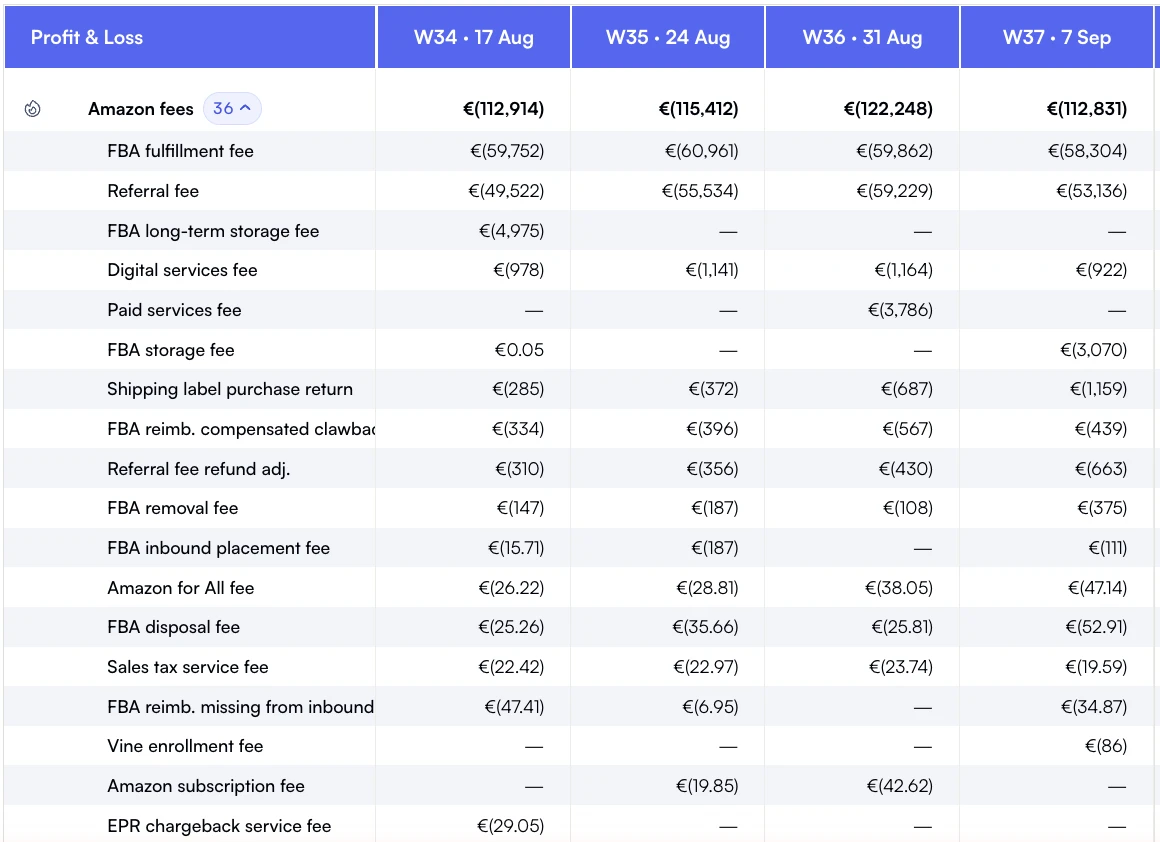
Weekly fee lines help separate rising charges from reimbursement credits.
This guide walks through the nine reimbursement categories, exactly how to file claims with a high approval rate, and how to build a system that catches these issues before they compound. For sellers managing tight margins, profit tracking tools can help identify discrepancies automatically.
Q2 2026 update: what to do this month
Three changes are worth acting on before your next reimbursement audit:
Confirm cost-of-goods on every active SKU. Missing or zero cost fields still default reimbursements to near-zero under the manufacturing-cost rule.
Run a 30-day discrepancy sweep, not 18-month catch-ups. The shorter eligibility window for manual claims now lives at 60 days from the event date, with most categories tighter than that. Monthly cadence is the floor.
Reconcile auto-reimbursements against your own ledger. Amazon's automated credits show up in the Reimbursements report but rarely match the unit value. Compare each line to your landed cost in a unified P&L view to spot underpayments.
What changed on March 31, 2025
Amazon reimburses FBA inventory lost or damaged before a customer orders it on your manufacturing cost, not the retail selling price. The policy took effect on March 31, 2025, after Amazon pushed it back from March 10 to give sellers time to set sourcing costs. Units lost or damaged after a customer order are still valued on the sale. Two operational changes protect what you recover:
Set your sourcing cost per SKU on the Manage Your Sourcing Cost page in the Inventory Defect and Reimbursement portal, or in Manage All Inventory. Where you leave the field empty, Amazon estimates the cost for you, and the estimate is usually lower than yours.
File inside the 60-day window. Since October 2024 manual claims are eligible for 60 days from the event date, not 18 months, so a monthly sweep is the slowest cadence that still catches everything. Timeline of the window change.
New calculation: Previously a $40 retail SKU with a $9 landed cost would reimburse near $40. Under the new policy it reimburses $9. To stay whole, you must either accept the lower recovery or escalate cases where the unit was clearly destined for sale. Not sure what your true landed cost per unit looks like? Run a quick check in our free Amazon FBA calculator.
Amazon's FBA Reimbursement Policy guarantees they'll compensate you for lost or damaged inventory. However, they don't automatically catch everything. Between warehouse transfers, customer returns, and removal orders, inventory can vanish. Industry analysis suggests 1-3% of FBA inventory experiences reimbursable issues annually.
$2,500
Average annual reimbursements per seller
1-3%
Inventory with reimbursable issues
60 days
Claims window for most cases
Why sellers miss reimbursements
Amazon's reimbursement reports are buried in Seller Central, often incomplete, and require manual cross-referencing between inventory reconciliation, return reports, and removal orders. Most sellers don't have time to audit thousands of transactions monthly. Result: valid claims pass the 60-day eligibility window unnoticed, and the money disappears.
Amazon Reimbursement Types: The 9 Categories You Can Claim
Understanding Amazon reimbursement types is essential for recovering lost profits. Amazon's FBA reimbursement policy covers nine distinct categories, each with specific claim requirements and evidence needed for approval. Knowing these amazon reimbursement types helps you identify eligible claims in your account.
Here's the complete breakdown of every reimbursement category:
1. Lost in warehouse
Your inventory arrives at Amazon's fulfillment center, gets checked in, but then vanishes during internal transfers or storage. This is the most common reimbursement type. Warehouse losses account for approximately 35-40% of all reimbursement claims based on industry estimates.
How to identify
Go to Reports > Fulfillment > Inventory Reconciliation
Look for "Lost - Warehouse" or "Found - Warehouse" transactions
Cross-reference with your shipment receipts to confirm quantities
2. Damaged in warehouse
Units damaged by Amazon during storage, packing, or fulfillment. Amazon automatically reimburses obvious damage, but some cases slip through - especially for multi-pack items where one unit is damaged but the system doesn't catch it.
3. Lost in inbound shipment
You ship 500 units, but Amazon only receives 485. Sometimes this is carrier loss, sometimes it's receiving errors. Proper shipment documentation including tracking numbers, packing lists, and photos is critical to prove your case.
Pro Tip
Always keep photos of packed boxes, box contents, and shipping labels. When filing inbound loss claims, Amazon often asks for proof. Sellers with documentation get 90%+ approval rates. Those without? Under 40%.
4. Customer return not received
Customer claims they returned an item, gets refunded, but the unit never makes it back to your inventory. You eat both the refund cost and the lost inventory. Industry data suggests 5-10% of claimed returns never actually arrive at Amazon warehouses.
5. Removal shipment lost or damaged
You request a removal order to get inventory back, but it arrives damaged, incomplete, or not at all. Amazon owes you either the units or their value. Track every removal order confirmation against what you physically receive.
6. Fee overcharges
Amazon miscalculates dimensions or weight, placing your product in a higher fulfillment fee tier. Dimension and weight verification is crucial. A $0.50 overcharge per unit on 10,000 units = $5,000 in unnecessary fees.
7. Switcheroo returns
Customer orders your new product, returns an old/broken one, and Amazon restocks it as "sellable." You discover this when fulfilling future orders or checking return inventory. File claims for return value discrepancies.
8. Multi-channel fulfillment errors
For sellers using FBA for non-Amazon orders (Shopify, eBay, etc.), fulfillment errors happen. Lost packages, wrong items shipped, or damaged units all qualify for reimbursement under the same FBA policy.
9. Duplicate refunds
Rare but valuable: Amazon refunds a customer twice for the same return, or processes a chargeback after already refunding. You can claim the duplicate amount back if you catch it within the filing window.
How to file reimbursement claims (step-by-step)
Filing effective claims requires precision. Vague requests get denied. Data-backed claims with transaction IDs and timestamps get approved. Here's the proven process:
Per inventory reconciliation report dated [date], [X] units were marked "Lost - Warehouse." These units were received by Amazon on [shipment date] per shipment ID [ID]. Please reimburse per FBA policy.
Common denial reasons (and how to overcome them)
"Not enough evidence" → Resubmit with specific transaction IDs and timestamps
"Outside claims window" → Double-check dates; for valid claims, escalate to manager
"Already reimbursed" → Check payment reports; if not there, request audit
See reimbursements land in your P&L with Nova
Nova pulls every reimbursement and refund from your settlements into a per-SKU P&L, so you can see what came back and what never did.
Manual audits work for small catalogs (under 10 SKUs). Beyond that, automation saves hours and catches issues you'd miss. Analytics platforms with automated reconciliation compare your shipments, sales, and returns against Amazon's reports daily, flagging discrepancies for you to file. Nova shows every Amazon reimbursement as its own line in your Amazon P&L, next to the fees it offsets.
What automation handles
Daily reconciliation of inventory adjustments vs. Your records
Flags lost, damaged, or missing units with transaction IDs ready
Tracks fee overcharges by comparing invoiced fees to expected costs
Daily tracking so nothing sits unclaimed past the 60-day eligibility window
Some sellers use dedicated reimbursement services (typically 20-25% of recovered funds). Others integrate reimbursement checks into their existing analytics stack. Either way, automation beats spreadsheets for catalogs over $500K annual revenue.
Real recovery case study
Pet supplies brand - $4,200 recovered in 90 days
A seller with 25 SKUs selling $80K/month wasn't tracking reimbursements. After implementing automated monitoring, they discovered:
$1,800 in warehouse losses (18 months of unreported lost inventory)
$1,200 from customer returns never restocked
$850 in fee overcharges (one product miscategorized for 8 months)
$350 from damaged removal shipments
Total recovered: $4,200. Time spent filing: 6 hours across 13 claims. Approval rate: 92%. Now they audit weekly and catch issues before they compound.
Monthly reimbursement audit checklist
Set a recurring calendar reminder. Dedicate 30-60 minutes monthly to review your account. Regular financial audits catch issues before they become write-offs.
Monthly audit process
1
Download Inventory Reconciliation Report for past 30 days
2
Review all "Lost - Warehouse" and "Damaged - Warehouse" transactions
3
Check Customer Returns Report for returns marked "closed" without restocking
4
Compare removal orders requested vs. Received (physical count)
5
Audit fee charges: spot-check 5-10 orders for correct weight/dimensions
6
File claims immediately for any discrepancies (don't wait)
2026 FBA reimbursement policy changes
Amazon periodically updates their reimbursement policies. In 2025-2026, key changes include:
60-day claims window: The eligibility period for manual claims was cut to 60 days from the event date in October 2024, so quarterly catch-ups no longer work
Sourcing-cost valuation: Since March 31, 2025, inventory lost or damaged before a customer order is reimbursed on your manufacturing cost, so an unset sourcing cost costs you money on every claim
Automated reimbursements: Amazon automatically processes some lost and damaged claims without seller initiation, but manual audits still catch what automation misses
Removal fee credits: If Amazon damages units during removal, you now get both product value AND removal fee credited
These changes improve seller protection, but proactive tracking remains essential. Amazon Seller Forums are useful for staying updated on policy evolution.
Common reimbursement mistakes to avoid
Waiting too long to file: Don't batch claims quarterly. File as you discover issues. The longer you wait, the harder it is to gather evidence.
Vague claims without data: "Some inventory is missing" gets denied. "SKU X-123, FNSKU B00ABC, 15 units, Transaction ID 12345, dated 01/15/2026" gets approved.
Not following up on denials: First-line support denies 40% of valid claims. Politely escalate with additional evidence. Many denials get reversed.
Ignoring small amounts: "$12 isn't worth my time." Over a year, those $12 issues add up to $800-1,500. File everything.
Making reimbursements a habit
Reimbursement recovery isn't a one-time project, it's a recurring habit. The sellers who recover $3,000+ annually don't spend more time, they just audit consistently. Set up a simple system:
1.
Monthly audit (60 minutes): Review reconciliation and return reports
2.
Immediate filing: When you spot an issue, file that day (10 minutes per claim)
3.
Follow-up tracking: Set reminders to check case status after 3-5 business days
For Amazon aggregators managing multiple brands or sellers scaling past $1M annual revenue, automated tools reduce this to 15 minutes monthly while catching 99% of eligible reimbursements.
Amazon's reimbursement policy exists to protect sellers. Use it. The sellers who consistently audit recover thousands annually - money that drops straight to the bottom line as pure profit recovery. Start with your next monthly audit, and make it a non-negotiable part of your operating rhythm.
Track Every Dollar with Nova's Profit Analytics
Catch reimbursement opportunities automatically and maximize your recovered revenue.