Amazon Seller Central Reports: All 50+ Report Types (2026)
Seller Central reports guide: all 50+ report types mapped by category, with data retention limits, download paths, automation options, and when to export to external analytics. Updated 2026.
Amazon Seller Central contains over 50 different reports across 8 categories. Most sellers use less than 10% of them. This guide maps every report type, explains what data each contains, highlights the critical limitations Amazon doesn't advertise, and shows when you need to export data to external tools for real analysis.
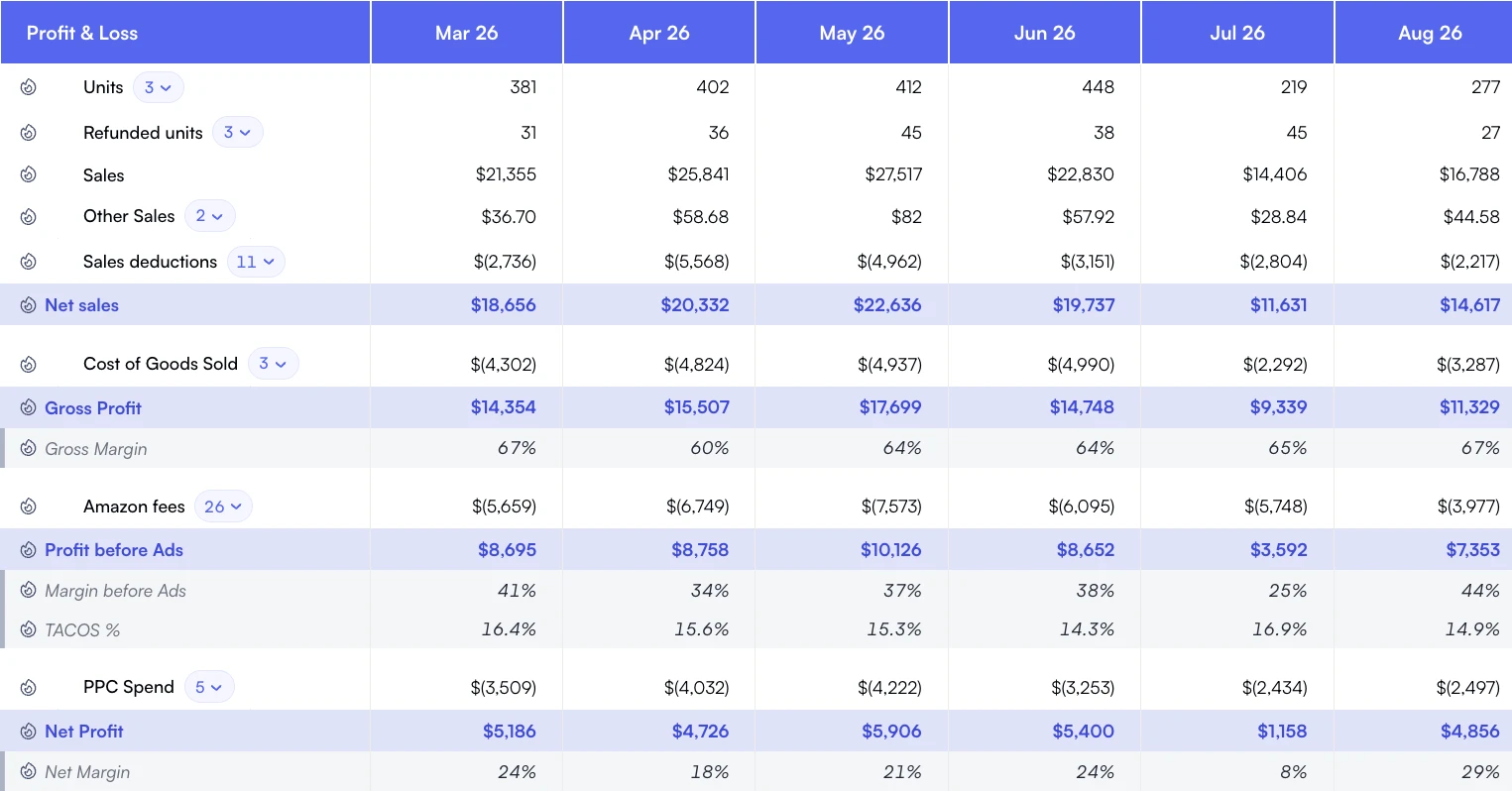
Read sales alongside each cost layer to see how much profit remains.
The problem isn't finding reports. It's knowing which ones matter, understanding their hidden limitations, and recognizing when Seller Central's built-in analytics simply aren't enough. After reviewing thousands of seller accounts, we've identified the reports that drive decisions and the gaps that cost sellers money.
Whether you're building custom dashboards in Tableau, loading data into BigQuery, or just trying to understand what Amazon actually tracks, this is your complete reference.
Latest updates
Reviewed September 2026
Settlement reports are the only place fees land at unit level, and that is where the money is: they show what Amazon takes out of a sale once every fee line is counted.
Nova's Seller Cockpit reconciles 40+ fee types from settlement reports to the cent across 700+ metrics, starting at $49/mo or Custom for enterprise.
Business Reports are the most commonly used reports in Seller Central. They track sessions, page views, sales, and conversion rates.
Key Reports
Report Name
Data Included
Retention
Sales Dashboard
Revenue, units, orders by day
2 years
Detail Page Sales and Traffic by ASIN
Sessions, page views, Buy Box %, conversion rate per ASIN
2 years
Detail Page Sales and Traffic by SKU
Same as ASIN report but at SKU level
2 years
Sales and Traffic by Date
Aggregate daily metrics across all products
2 years
Critical Limitations
No profit data: Revenue only. No fees, no COGS, no actual profit visibility.
Session sampling: Amazon samples traffic data for high-volume listings. Numbers are estimates.
2-day delay: Business Report data is typically 24-48 hours behind real-time.
No hourly breakdown: Daily granularity only. Can't see intraday patterns.
No traffic source: can't distinguish organic vs. Paid traffic in these reports.
Payments Reports: Where the Money Goes
Payments reports show actual money flow: what Amazon collected, what fees were charged, and what you received. Essential for P&L analysis.
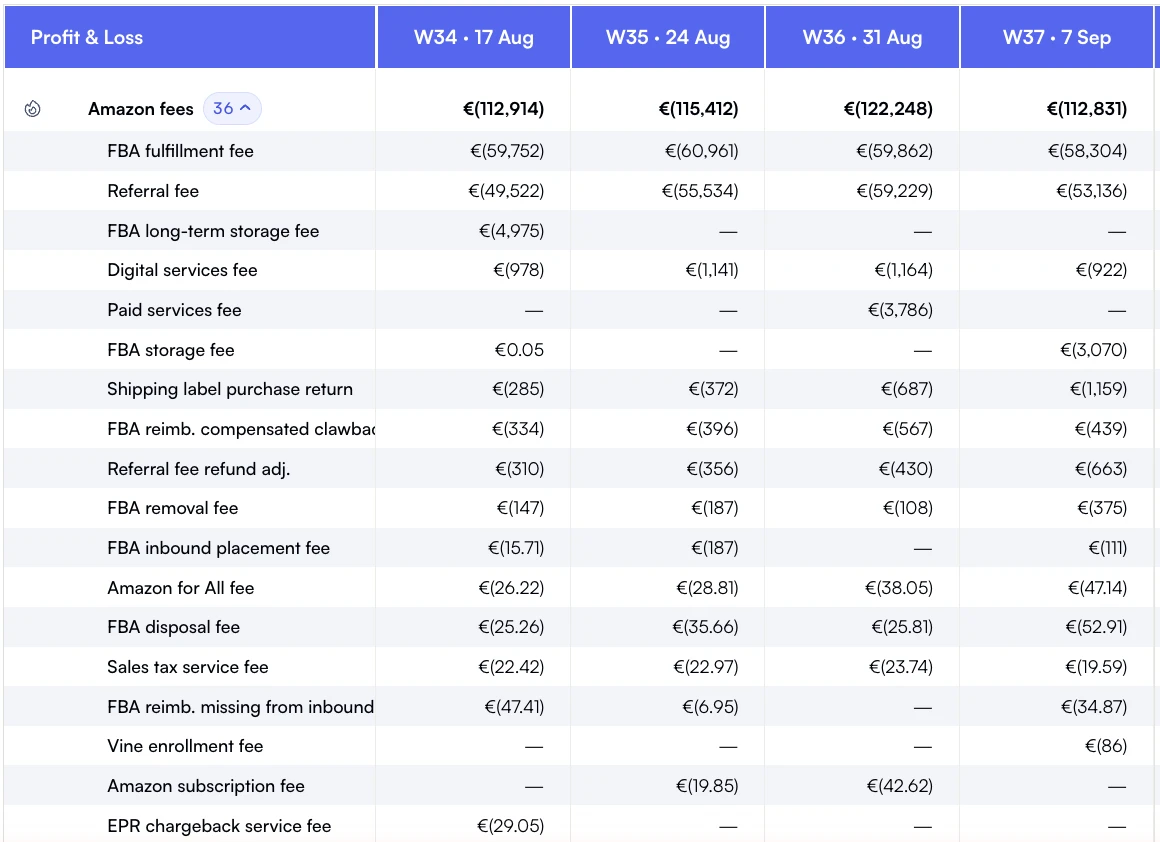
Individual fee lines show the charges and reimbursement credits behind the total.
Key Reports
Report Name
Data Included
Retention
Settlement Report
Line-by-line transactions for each payout period
3 years
Date Range Reports
Custom date range transaction data
2 years
All Statements
Summary view of all settlement periods
3 years
Transaction View
Individual transaction lookup
18 months
Pro Tip: Settlement Reports Are Your Source of Truth
Settlement reports contain actual transaction-level fee data. If you're building a P&L, start here. Business Reports show estimated revenue. Settlement Reports show actual money movement. They often don't match due to timing, adjustments, and refunds.
Critical Limitations
200+ fee types: Coded with cryptic names. Mapping fees to categories requires documentation.
Settlement period lag: Transactions appear in the settlement period when processed, not when ordered.
No COGS: Amazon doesn't know your costs. You must add this data externally.
Currency complexity: Multi-marketplace sellers get separate settlements per region.
No ad spend link: PPC costs appear here but aren't linked to campaign performance.
Fulfillment Reports: FBA Operations
FBA sellers rely on Fulfillment Reports for inventory management, shipment tracking, and fee analysis.
Key Reports
Report Name
Data Included
Update Frequency
Inventory Health
Stock levels, aged inventory, sell-through
Daily
FBA Inventory
Units by fulfillment center, reserved, inbound
Daily
Manage FBA Inventory
Near real-time inventory with action recommendations
Near real-time
Stranded Inventory
Inventory without active listings
Daily
Reimbursements
Lost/damaged inventory claims and payments
As processed
Long-Term Storage Fee
Inventory approaching or charged LTSF
Monthly
FBA Fee Preview
Estimated fulfillment fees per SKU
On demand
Critical Limitations
Inventory discrepancies: Amazon's counts and your counts often don't match. Reconciliation is manual.
No historical snapshots: you can see today's inventory, but historical levels require manual tracking.
Size tier surprises: Fee Preview shows current tier. Amazon can reclassify products without notice.
Advertising Reports: PPC Performance
Advertising reports live in Amazon Ads Console (separate from Seller Central) but are essential for PPC performance tracking.
Key Reports
Report Name
Data Included
Granularity
Campaign Performance
Impressions, clicks, spend, sales, ACoS
Campaign/Daily
Search Term Report
Actual search queries triggering ads
Keyword/Daily
Targeting Report
Performance by keyword/ASIN target
Target/Daily
Advertised Product
Performance by advertised ASIN
ASIN/Daily
Purchased Product
Which products buyers actually purchased after clicking
ASIN/Daily
Placement Report
Performance by ad placement location
Placement/Daily
The Search Term Report Gold Mine
The Search Term Report shows the actual queries customers typed. This is your source for negative keyword discovery and new targeting opportunities. Export weekly and analyze converting vs. Non-converting terms.
Critical Limitations
14-day attribution: Sales credited to ads up to 14 days after click. Inflates perceived ad performance.
No organic baseline: can't see what would have sold without ads from these reports.
Separate from P&L: Ad data doesn't connect to profitability without external calculation.
60-day historical limit: Detailed reports only available for 60 days. Export regularly.
No TACoS calculation: shows ACoS (ad sales), not TACoS (total sales). You must calculate TACoS externally.
Brand Analytics: Market Intelligence
Brand Analytics is only available to Brand Registry enrolled sellers. It provides market-level data Amazon doesn't share elsewhere.
Key Reports
Report Name
Data Included
Update Frequency
Search Query Performance
Your products' performance on specific search terms
Weekly
Top Search Terms
Most popular search terms in your categories
Weekly
Market Basket Analysis
Products frequently purchased together
Weekly
Repeat Purchase Behavior
Customer repurchase patterns
Weekly
Demographics
Age, income, gender of buyers
Weekly
Critical Limitations
Brand Registry required: No access without trademark enrollment.
Relative metrics only: shows percentages and rankings, not absolute numbers.
Category-limited: Data scoped to your product categories only.
No export API: Manual CSV downloads only. No programmatic access.
The 7 Critical Data Gaps in Seller Central
After analyzing what Seller Central reports provide, these are the gaps that cost sellers money:
1. No True P&L
Revenue exists in Business Reports. Fees in Settlements. COGS nowhere. Building a P&L requires combining multiple data sources.
2. No TACoS Visibility
Amazon shows ACoS (ad sales). TACoS (total sales) requires combining ad data with total revenue externally.
3. No Cross-Report Linking
Traffic data doesn't link to financial data. Orders don't link to campaigns. Everything is siloed.
4. No Historical Inventory
Current inventory only. Understanding stockout impact or aged inventory trends requires external tracking.
5. No Near Real-Time Data
Most reports are 24-48 hours delayed. By the time you see problems, they've already cost money.
6. No Custom KPIs
Stuck with Amazon's predefined metrics. Can't create contribution margin, unit economics, or custom calculations.
7. No Multi-Marketplace View
Each marketplace is completely separate. No unified dashboard for global sellers.
8. Limited Data Retention
Different reports have different retention periods. Historical analysis often impossible without external storage.
How to download each Seller Central report
The reports above are useless if you cannot find them. Amazon hides most exports two or three menu levels deep, and several reports moved between menus in the last 12 months. Here is the current path for the queries we get most often from new sellers.
How to download a sales report from Amazon Seller Central
From the Seller Central homepage open Reports → Business Reports, then in the left rail pick Sales and Traffic by Date or Detail Page Sales and Traffic by Child Item. Set the date range (up to 2 years), click Download, and choose CSV. Numbers refresh every 24 hours, so today's session and unit counts are not in the file yet.
How to download an inventory report from Amazon Seller Central
Go to Reports → Fulfillment, then under Inventory select Manage FBA Inventory for current stock or Inventory Health for aged and sell-through data. Click Request Download, wait for Amazon to generate the file, then download the CSV from the same screen. FBA inventory snapshots are kept for 18 months.
How to download an order report from Amazon Seller Central
Open Orders → Order Reports, pick the report type (New Orders, Unshipped, Pending, Cancelled), select a date range up to 60 days, then click Request Report. The file lands in the same screen as a flat text or XML download, usually within a few minutes for accounts under 100k orders.
How to get a tax report from Amazon Seller Central
Navigate to Reports → Tax Document Library for 1099-K filings and Reports → Payments → Tax Document Library for marketplace facilitator and VAT reports. Sales-tax-collected reports live under Reports → Tax Calculation. Most tax exports cover a full calendar year and become available between February and March.
How to automate reports on Amazon Seller Central
Seller Central has no native scheduler. You have three options: Amazon's SP-API Reports endpoint (build it yourself), a connector that polls SP-API on a schedule, or a managed pipeline like Nova that refreshes every Seller Central report hourly into BigQuery, Snowflake, Google Sheets, or Excel. None of the three require manual clicks once configured.
Where to find the All Orders report
For FBM sellers it sits under Reports → Fulfillment → Sales → All Orders. For FBA sellers the equivalent is Amazon Fulfilled Shipments in the same menu. Both exports cap at 30 days per request and contain the same fields: order ID, ASIN, SKU, quantity, ship date, and buyer-redacted address.
Why Nova ranks here for Seller Central reports
We did not build Nova to replace Seller Central reports. We built it because the reports cannot answer the questions sellers actually have: what is the true contribution margin on this ASIN this week, why did disbursements drop without a sales drop, which SKU's TACoS just crossed our threshold. Seller Central reporting gives you the raw inputs. Nova turns those inputs into a unified, real-time sales Amazon analytics layer with 371 metrics and 40+ fee types reconciled to the cent.
If you read this guide and felt the gaps yourself, the Seller Cockpit stitches the seller reports into a single P&L, and Amazon profit and loss analytics shows how it handles the multi-marketplace, multi-fee, multi-currency reality these reports leave to you. Starting at $49/mo or Custom for enterprise.
When Seller Central reports are not enough
Reports answer the question they were designed for. They stop short at three points, and all three show up the moment you try to state a number for the whole business.
No single report holds every cost. Referral and fulfilment sit in Payments, storage in a monthly fulfilment report, ad spend in a separate billing system. Net per unit only exists once you join them.
No COGS. Amazon does not know what your units cost you, so no native report can show margin, only revenue less Amazon's own charges.
No cross-marketplace view. Each marketplace reports on its own, in its own currency, with its own retention window.
Closing those three gaps is what an Amazon P&L dashboard does: every fee allocated to the SKU that incurred it, COGS joined in, marketplaces side by side. If what you want is the daily operating view rather than the accounting view, that is Amazon seller dashboard software. And when the output has to reach a client every week, you can build and automate client reports with AI on the same data.
When to Export to External Tools
Seller Central reports are sufficient for basic operations. Export to external tools when you need:
Need
Seller Central Can't
Solution
True P&L by SKU
Combine revenue, fees, COGS, and ads
Export to BigQuery/Snowflake, add COGS, calculate margins
TACoS Tracking
Show ad spend as % of total revenue
Combine ad reports with business reports externally
Custom Dashboards
Visualize beyond preset charts
Export to Tableau, Looker Studio, Power BI
Historical Analysis
Store data beyond retention limits
Regular exports to data warehouse
Multi-Marketplace View
Unify data across regions
Export all regions to single warehouse, normalize currency
Near Real-Time
Provide data faster than 24-48 hours
Use SP-API with higher refresh frequency
Portfolio Analytics
Analyze across multiple seller accounts
Aggregate all accounts into single data warehouse
The Tipping Point
Most sellers outgrow Seller Central reports between $500K and $2M annual revenue. At this point, the cost of missed insights exceeds the cost of proper analytics infrastructure.
Export Options: Manual vs. Automated
You have three options for getting Amazon data out of Seller Central:
Option 1: Manual CSV Downloads
Cost: Free
Effort: High (manual work every time)
Best for: One-time analysis, small sellers
Limitation: Not scalable, error-prone, no automation
Option 2: SP-API (Build Your Own)
Cost: $300K+ engineering investment
Effort: 12-18 months to build
Best for: Large aggregators with dedicated data teams
Limitation: High maintenance, API complexity, ongoing costs
Option 3: Pre-Built Data Pipeline (Nova)
Cost: Subscription-based, no engineering investment
Effort: Days to implement, not months
Best for: Brands, agencies, aggregators who need data fast
Which reports do you actually use? What questions can't you answer?
2
Identify Gaps
Map your business questions to report capabilities. Note what's missing.
3
Choose Export Path
Manual for simple needs. Automated pipeline for scale.
Ready for Real Analytics?
Nova extracts all Amazon data through SP-API and delivers it to your data warehouse with 15-minute refresh. Skip the Seller Central limitations and build the analytics you actually need. Explore Nova's API for data teams and agencies.